• Podcasts
  • Picks
  • Reviews
  • Archives
  • Contact
  • About

Clear


Posted by Ian on 19 Feb 2012 / 1 Comment


Clear for iPhone is a brand new todo manager launched last week by Realmac software. Now you may be thinking that anyone launching a todo manager is a bit late to the market. There is a vast amount of choice when it comes to todo managers, from todo.txt through to OmniFocus with Remember the Milk sitting in the middle of the complexity scale. What makes Clear stand out?

First off is the design. It take’s a brand new approach to interface design which is saying something when you consider that app’s have been available on iOS for around four years now. The bold approach taken in Clear, which will undoubtedly be copied by others is that there are no buttons. Anywhere. Everything is controlled via swipe, touch and pinch movements.
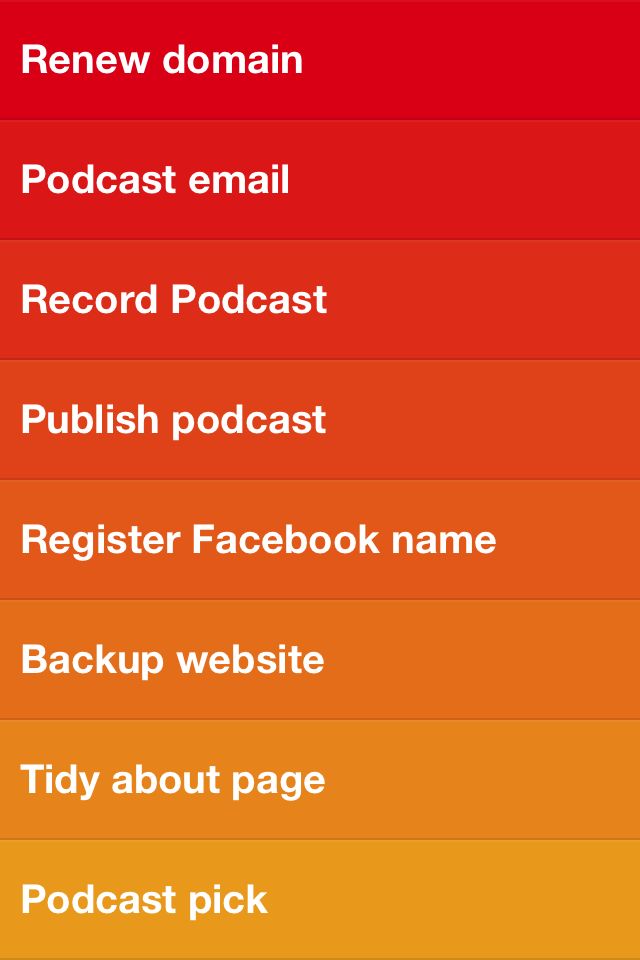
Create a top level list and then touch to enter it. Pinch out to add a new todo. Pinch out again to enter another. There are no start dates, due dates, contexts – none of that muck. It’s a simple list. To change priority touch and hold, then move up or down in the list. The colour and order is the priority. Swipe to complete, pinch in to collapse to the top list. Pinch in again and you get some very simple options. Realmac’s video is a great demo of the app.

Clear for iPhone – Available Now! from Realmac Software on Vimeo.

While the interface looks great a special shout out for the sound as well. When you complete a number of tasks it sounds like you’ve picked up some coins in Super Mario – it’s lovely, like a small reward for completing your tasks. I almost forgot – I love the icon. Stands out clearly from other icons making it easy to find in a crowded screen or folder.

There is no support for iPad or backing up to iCloud but I’ve no doubt given the success of the app (it hit No 1 app in both the US and UK) that we will see a number of features added over time. I don’t expect to see the app gain in complexity though. What makes it so useful is speed of entry and the lack of any extra attributes keeps the interface simple, quick and easy to use.

For £0.69 it’s a bargain if your looking for a (very) simple list/todo manager. It’s also a must buy if your in any way interested in app or UI design. It makes the rather dry subject of todo management almost a delight.

Share this:

  • Facebook
  • Twitter
  • Google +1
  • Pocket

Written by Ian

Ian lives and works in Glasgow, Scotland. By day he works in the IT department for a large manufacturing company but outside work he is a keen follower of all things digital. In 2006 he switched to using a Mac and has never looked back. To find out more about Ian visit the about page for more info.

Related Posts


DigitalOutbox Episode 107
February 17, 2012

1 Comment


Macjim
1 years ago


Here here, I can concurr with you as it is one of the best, if not the best ToDo apps ever! Simplicity and ease of use is the name of the game here and it works. Just what doctor ordered.


Leave a Reply

  Cancel Reply


  • Search

  • Subscribe

    • Subscribe in iTunes
    • Subscribe via RSS (audio)
    • Subscribe via RSS (blog)
    • Comment via Skype
  • Find us on Facebook

  • Recent Tweets

    • On the blog... DigitalOutbox Episode 164: DigitalOutbox Episode 164 DigitalOutbox Episode 164 – Google I/O Pla... http://t.co/oPwNwbX94d
    • DigitalOutbox Ep 164 now on iTunes - http://t.co/4Uspka3wIA or via - http://t.co/vbhQDaCuUQ - Google I/O
    • On the blog... DigitalOutbox Episode 163: DigitalOutbox Episode 163 DigitalOutbox Episode 163 – Adobe MAX and ... http://t.co/0wZlchwNh3
    • We’ve moved podcast feeds away from Feedburner and working well at this end. Let us know if you have any problems.
    • DigitalOutbox Ep 163 now on iTunes - http://t.co/4Uspka3wIA or via - http://t.co/ai1ze1f4fP - Adobe MAX and Windows Blue
  • Popular Posts

    • DigitalOutbox Episode 21
      October 26, 2009
    • DigitalOutbox Episode 19
      October 12, 2009
    • DigitalOutbox Episode 11
      August 23, 2009
  • Recent Posts

    • DigitalOutbox Episode 164
      May 17, 2013
    • DigitalOutbox Episode 163
      May 10, 2013
    • DigitalOutbox Episode 162
      May 3, 2013


  • Recent Comments

    • Ian on DigitalOutbox Episode 159
    • treacle on DigitalOutbox Episode 159
    • admin on DigitalOutbox Episode 127
    • Graham on DigitalOutbox Episode 127
    • Jim on DigitalOutbox Episode 108
  • Recent Tweets

    • On the blog... DigitalOutbox Episode 164: DigitalOutbox Episode 164 DigitalOutbox Episode 164 – Google I/O Pla... http://t.co/oPwNwbX94d
    • DigitalOutbox Ep 164 now on iTunes - http://t.co/4Uspka3wIA or via - http://t.co/vbhQDaCuUQ - Google I/O
    • On the blog... DigitalOutbox Episode 163: DigitalOutbox Episode 163 DigitalOutbox Episode 163 – Adobe MAX and ... http://t.co/0wZlchwNh3
    • We’ve moved podcast feeds away from Feedburner and working well at this end. Let us know if you have any problems.
    • DigitalOutbox Ep 163 now on iTunes - http://t.co/4Uspka3wIA or via - http://t.co/ai1ze1f4fP - Adobe MAX and Windows Blue
  • Subscribe

    • Subscribe in iTunes
    • Subscribe via RSS (audio)
    • Subscribe via RSS (blog)
    • Comment via Skype
  • Follow

    • @digitaloutbox
    • DigitalOutbox on Facebook
    • @cheesyuk on twitter
    • @shweepa on twitter
    • @talkrhubarb on twitter

Copyright © 2009–2013 by DigitalOutbox. All Rights Reserved · Powered by WordPress using customised Ares theme.